Example: Configuration and Processing of a Communication
Suppose a provider wants to send customers an SMS Short Message Service.
A text messaging service component of most mobile telephone systems. SMS uses standardized communication protocols to enable mobile phone devices to exchange short text messages. or push notification when their bill is ready. This section examines the end-to-end workflow for an individual bill notification communication, from configuration to distribution.
Short Message Service.
A text messaging service component of most mobile telephone systems. SMS uses standardized communication protocols to enable mobile phone devices to exchange short text messages. or push notification when their bill is ready. This section examines the end-to-end workflow for an individual bill notification communication, from configuration to distribution.
Configuration
Communication Configuration
To notify customers that their bill is ready by either SMS or push notification, the Business Configuration A module in the CMP Administation console that provides for viewing and modification of business and user applicable system configuration. user A person with the capability to log in to the CMP GUI software, such as a customer service advisor or agent. creates a communication template in the Business Configuration console in Communications > Communications List:
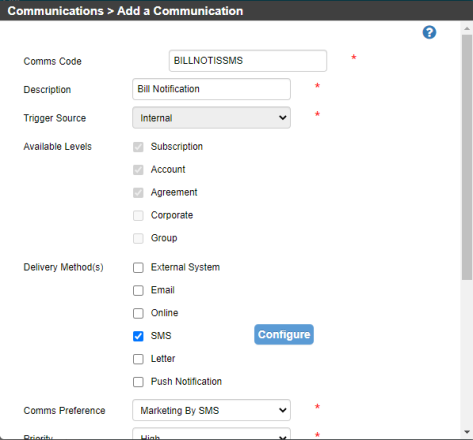
The settings are as follows:
| Name | Description |
|---|---|
| Comms Code | A unique alphanumeric code for the communication. Allowed characters are A - Z and 0 - 9. In this case, the code is BILLNOTISMS. |
| Description | A brief meaningful descriptive name for the communication, in this case Bill Ready Notification. |
| Trigger Source | Whether the initiating event for the communication is internal to CMP or from an external system, for example a network. In this case, the trigger source will be a notification from a print bureau in the form of a JSON file.* |
| Available Levels | The levels in the CMP hierarchy at which the communication can be selected and generated; Subscription in this case. |
| Delivery Method(s) |
SMS* |
| Comms Preference | The set of preferences that apply to this communication. In this case, the provider has selected the Default Comms Code Preferences. |
| Priority | Very High - it's important that a customer know that they have a bill to pay. |
| Security Level |
The security levels or roles that have access to the communication, can view it in the system, and select it. In this case the security level is Everyone, the lowest level. |
| Selectable | Whether the communication can be selected in the CMP GUI - it is, in this case. |
| Active | Whether the communication is available to new subscribers. This communication is active. |
| Explanation | Additional explanatory text to help the future CMP users understand the purpose and configuration of the communication: "Comms via SMS to advise that the customers next bill is available" |
*These settings will be examined in more detail.
To configure the SMS message, the user clicks Configure in the Add a Communication window and provides:
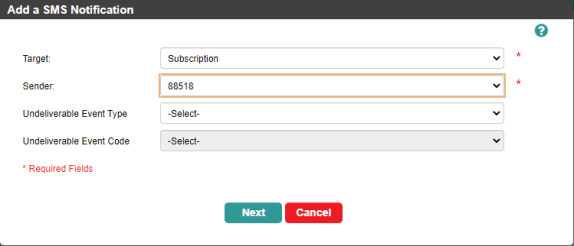
- A target - in this case the mobile number at the subscription A billing entity that incurs a charge. Examples include a network attached device whose usage you want to measure and charge for, or a monthly software subscription level (according to the settings above, the communication can only be raised at subscription level).
- A sender - the mobile number used to send SMS from CMP Converged Monetisation Platform. The MDS Global product that supports customer care and billing for digital service providers. for the provider. This can be an alias.
Users can also choose to configure a workflow event that will be triggered if the SMS is undeliverable.
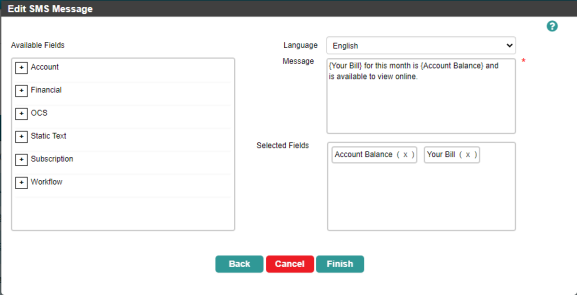
Next the user needs to configure the SMS message itself. The user chooses to send the text in English and selects two default fields to include:
{Your Bill}- a simple text default field that includes the words Your Bill in the SMS message.{Account- a default field that will enable CMP to retrieve the account balance from the CMP database. In the Cloud Monetisation Platform, a billing entity that can be used to manage payments on one or more subscriptions or payments for services. An account can hold details such as payments or invoices. Balance}
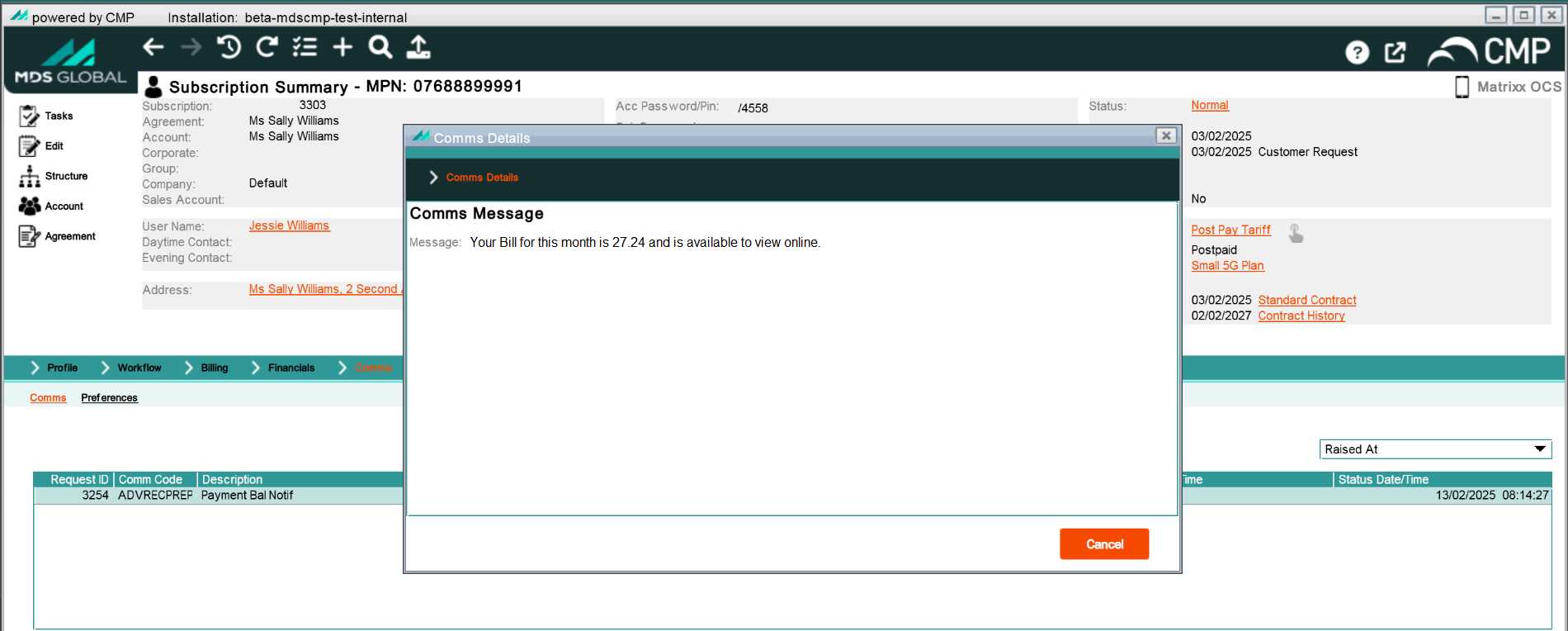
The final message for the SMS will be: {Your Bill} for this month is {Account Balance} and available to view online.
The preference that the user set for the SMS communication was the Default Comms Code Preference. It has been configured as follows:
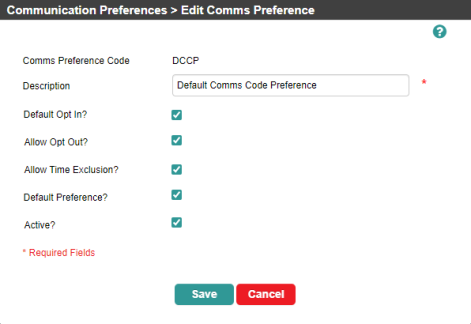
This means that by default, a customer In the context of the Cloud Monetisation Platform, an individual or organisation who has signed an agreement to take goods and services from a service provider. A customer receives a bill associated with one or more subscriptions, and can be a single end user or a large company with many subscriptions assigned to one agreement. is opted in to receiving a bill notification SMS, but opting out and setting a time exclusion period are allowed. This is expected, as customers may not want to be disturbed by SMS messages at certain times. The Default Comms Code Preference is also available to be applied to new subscriptions.
The trigger source for the communication is External - a notification from the print bureau. The user therefore configures a trigger action for the communication called BILL READY. This trigger raises a workflow event of the Billing type called SMS Bill Notification.
The comms can also be raised directly by selecting the comms code from the Comms drop-down.
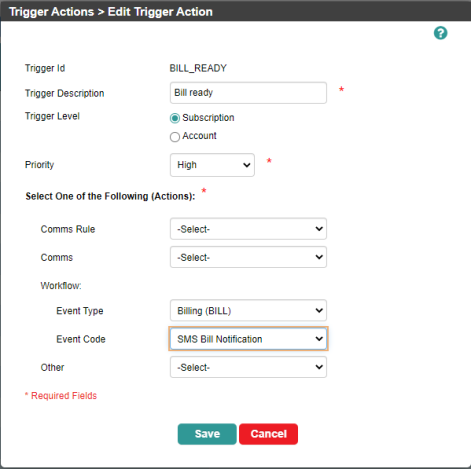
The SMS Bill Notification workflow event is configured to send the Bill Ready Notification SMS communication as soon as the event is created.
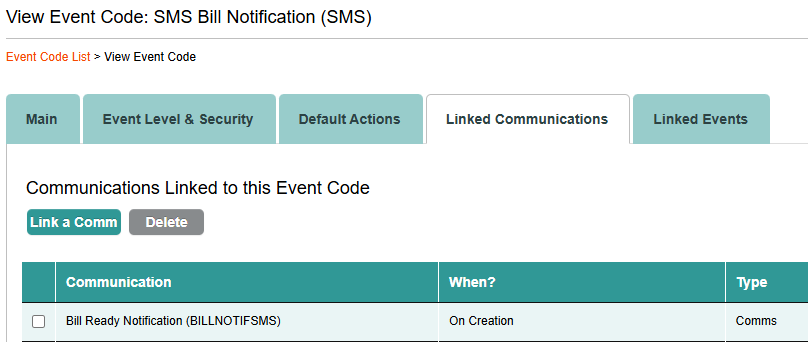
So the user has configured the following: A communication in the form of an SMS that alerts a customer that the bill for a subscription is ready. The message will include a subscription's account balance. When CMP receives a notification from an external system - the print bureau - this will trigger the creation of a workflow event that sends the communication.
Jobs and Daemons Configuration
The following jobs and daemons will be involved in processing the Bill Ready Notification communication. Configuration that affects the processing of the Bill Ready Notification communication is as follows:
Load Comms from Generic Format daemon
This daemon A computer program that runs as a background process, rather than being under the control of an interactive user. is configured to actively poll for JSON JavaScript Object Notation. JSON is a lightweight format for storing and transporting data, often used when data is sent from a server to a web page. messages on the externalComms queue with a specific channel defined. The ActiveMQ An open source generic message interface written in Java. It fosters the communication from more than one client or server, allowing it to act, for example, a messaging interface between CMP and external components. queues in which inbound triggers are placed are configured, as are the queues for erroneous triggers.
Notifications Monitor job
The Notifications job has been set up to fire automatically if a new external notification becomes eligible for processing.
Comms Monitor job
The Comms Monitor job will fire automatically if a new comms notification becomes eligible for processing. The job has also been configured with the date format to be used when representing dates in an SMS. The international dialling prefix is not configured to be displayed in SMS communications and the default language code is set to English.
Transmission Comms SMS to Handset daemon
The daemon is configured to actively poll for new messages every 100 milliseconds. It is configured to place messages on the outboundCommsSms queue to be picked up by an external system or by the SMPP adapter. The status to which it will update the communication after it is sent out of CMP is set as S (Sent).
Processing
Triggering the Communication
The print bureau sends a notification to CMP that a customer's bill is ready. The notification is in the form of a JSON schema A specification for JSON based format for defining the structure of JSON data., commsExternalTrigger.schema.
This JSON file is picked up by the Load Comms from Generic Format daemon, which is continuously polling the Active MQ queue for inbound trigger notifications. The daemon decrypts the JSON file and writes the record in the file to the TriggerNotification database table as follows:
- TriggerNotificationId - Auto-generated by the database
- SuppliedTriggerId - this is from the JSON
- DateTimeNotificationReceived- Current time/date
- TriggerChannelDTC is supplied in the JSON.
- SuppliedUniqueReference - This may or may not be supplied in the JSON and is intended to capture a unique reference for the message from the external system if one is supplied; for informational purposes only. In this case, it is not supplied.
- TriggerNotificationStatus - This is set to A - Awaiting Processing.
- AuditProcess, AuditUser, AuditTimestamp - the current date and time and the user and process responsible.
Once the TriggerNotification table is updated, the Notification Monitor is triggered automatically.
The Notification Monitor job cross-references the record (SuppliedTriggerId value) from the TriggerNotification table to the TriggerID value in the TriggerAction table to see what communication needs to be sent - BILLNOTISMS, in this case. The jobs raises the workflow event configured for BILLNOTISMS, which triggers a Comms Request.
The job creates an entry in CommsRequestHeader table with the following values:
- CommsRequestID - Autogenerated
- Priority - from the Priority on the TriggerAction table. Very High, in this case.
- EventNumber - The number for the configured workflow event (Billing SMS Bill Notification).
- TriggerNotificationId - from the TriggerNotification table
- CommsCode - from the TriggerAction table; BILLNOTISMS, in this case
- CommsStrategyHeaderCode - from the TriggerAction table
- Request Status - A - Awaiting Processing
- MergeDateTime - Null
- OverrideCommsDeliveryMethodCode - Null
- AuditProcess, AuditUser, AuditTimestamp - the the current date and time and the user and process responsible.
- CopyCommsRequestId - This is used if the comms needs to be resent
- IsEligabletoProcess - Yes
Because a workflow event is configured against the TriggerID in the TriggerAction table, the workflow will be raised against the supplied customer reference (the subscription number ) supplied in the original JSON file, using the Event Type (Billing) and Event Code (SMS Bill Notification) from the TriggerAction file.
Once the request has been completed, the job updates the TriggerNotificationStatus in the TriggerNotification table to P (Processed).
Gathering the Communication Details
When the new Bill Ready Notification communication is entered in the CommsHeaderRequest table, the Comms Monitor job is automatically fired and takes over the processing of the communication.
First it determines the delivery method. The job checks whether the OverrideDeliveryMethodCode field in the CommsHeaderRequest table is populated. This communication is not a one-off communication added in AgentView The graphical user interface of the CMP that is typically used by Customer Service Agents to access CMP customer and billing data. In versions prior to CMP 8.0, this was called the CMP GUI., so no override delivery method is set.
Next the job works out the Opt In/Out logic for the communication. The communication was configured to be raised at subscription level and set up with the Default Comms Code Preference. This means the job looks for an entry in the CustomerCommsPreference table at subscription level first and it finds one, bases the Opt In logic on that. The Default Comms Code Preference is that the customer is opted in to the communication. However, the preference is set up so that the customer can opt out.
In this case, the customer has not altered the settings of the Default Comms Code Preference, meaning they are opted in to the communication and they have not set a time exclusion, as shown here in the Comms > Preferences panel for the Subscription Summary in AgentView:

Once the Comms Monitor now gets a list of delivery methods associated with the comm and identifies out the highest priority method to populate the CommsRequestTargetDetail table. To do this, the Comms Monitor job must take into account any customer preferences, the delivery methods configured against the communication and the priority of those delivery methods.
Because the communication is raised at subscription level, the job first checks for customer preferences at this level. It finds that SMS is supported at this level. SMS is also the only delivery method configured for the communication, so the job need not consider delivery method priorities and use SMS as the delivery method.
Once the job has determined the delivery method is SMS, it must find the target, which is the mobile number at subscription level. The Bill Ready Notification communication was configured with Subscription as the target (as opposed to Longest Sub on CMP or Parent Subscription, which are only available at account level), so the jobs checks whether the subscription network In the context of CMP, the infrastructure on which usage of registered customers will be measured – this could be a mobile phone network, broadband network or other non-telecommunications network. will accept SMS (IsSMSAllowed = true on the Subs Network Type). It does; so the job retrieves the mobile number of the subscription to which the communication will be sent and updates the PrimarySerialNumber field on the CommsRequestTargetDetail table. The PrimarySerialNumber is written in E164 format.
Now that the Comms Monitor job has determined the delivery method and target for the communication, it must gather the details of the message. This means getting the values for any default fields used in the message and merging them with the message text as follows:
- The Comms Monitor job writes a record into the CommsRequestFieldDetail table.
- The job gets list of fields associated with the comms - {Your Bill} and {Account Balance} in this case.
- The job invokes the relevant beans used by the default fields to populate the CommsRequestFieldDetail table - the STATICTEXT and ACCOUNT beans respectively, in this case.
- The job repeats step 3 until the list of fields is complete and updates the RequestStatus in the CommsRequestHeader table to P(Processed).
- Then the job checks for time exclusions. In this case, the customer did not set any time exclusions.
- The job checks the CommsCodeLanguage table to identify which Message value should be used for the comm. In this case, the message is:
Your Bill}for this month is{Account Balance}and available to view online. - The job sets the Message value in the CommsRequestTargetDistribution table with the correct merged field (CommsFieldCode and TextValue from CommsRequestFieldDetail table) and sets the DistributionStatus to D (AwaitingDistribution).
The merged message created in step 7 is now ready to be sent.
Sending the Communication
The SMS To Handset (Transmission Comms SMS to Handset) daemon picks up entries that are ready to be sent via SMS.
The daemon queries the CommsRequestTargetDistribution table where:
- Distribution Status = D
- AND DeliveryMethod = SMS
- AND Time Exclusion >= Current Date and Time
The daemon creates the JSON file and puts it on the outboundCommSms queue as set for the daemon.
Once the message is placed on the queue, the job updates the DistributionStatus to S (Sent) and updates the SentDateTime on the CommsRequestTargetDistribution table.
The final step is to store the message in long-term storage so that it can be viewed in AgentView by an agent, as shown here:
The section Communications in AgentView goes into more detail.